Release Status & Expected Timeline
The official UP Super TET 2026 Admit Card will be released online on the UPESSC candidate portal (upessc.up.gov.in) approximately 7 to 10 days prior to the written examination, with release expected around 24 November 2026.
In accordance with our factual verification standards, SuperTET.com does not publish fake "active download buttons." As of 2 November 2026, admit cards have not yet been generated because application processing and scrutiny are currently ongoing. Once UPESSC issues the formal hall ticket press communiqué, our live status dashboard will immediately update with the direct login link.
Crucial Distinction: Admit Card vs. Exam City Slip
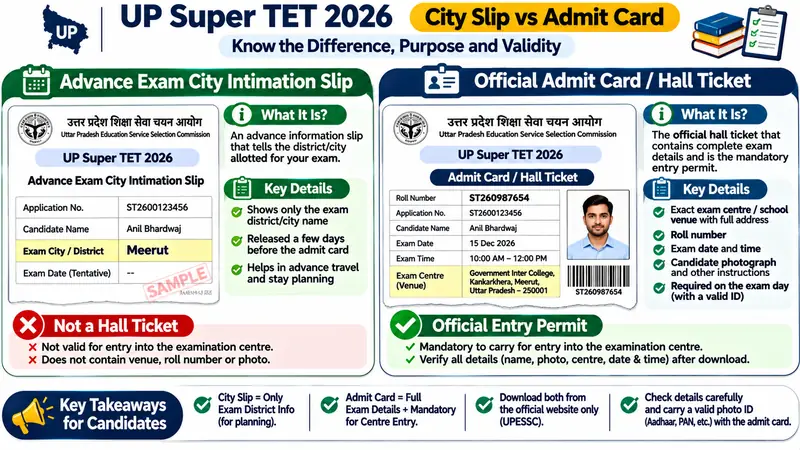
Candidates must not confuse the Advance Exam City Intimation Slip with the actual Admit Card:
| Feature | Exam City Intimation Slip | Official Admit Card (Hall Ticket) |
|---|---|---|
Expected Release | Expected ~20 November 2026 | Expected ~24 November 2026 |
Primary Purpose | Informs you of your allotted district city | Official legal entry permit into the exam hall |
Contains Exact Venue? | No (Only district name displayed) | Yes (Exact school name, address & room) |
Contains Roll Number? | No (Only application ID) | Yes (Roll number & OMR barcode) |
Valid for Hall Entry? | Not Valid for Entry | Mandatory Entry Document |
To check city allocation procedures, read our dedicated Exam City Slip Guide.
Step-by-Step Portal Download Instructions
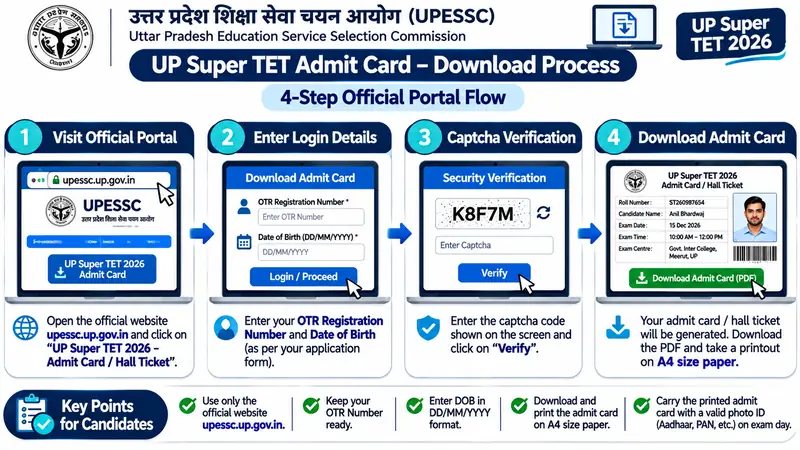
When the download window opens on upessc.up.gov.in, follow these 4 straightforward steps:
- Navigate to the official portal: upessc.up.gov.in and click on the "Download Admit Card / Hall Ticket — Advt. No. 05/2026" link.
- Enter your UPESSC OTR Number or Application Registration Number along with your Date of Birth (DD/MM/YYYY).
- Enter the alphanumeric Captcha security code displayed on the screen and click "Download Hall Ticket".
- Your admit card will generate as a printable PDF. Verify all fields, save the file to your device, and print at least two crisp copies on A4 paper.
Crucial Details to Check on Your Hall Ticket
Immediately after downloading, inspect the following fields carefully:
- Candidate Identification: Your Full Name, Father's/Husband's Name, and Date of Birth (must match your Class 10th certificate letter-for-letter).
- Photograph & Signature: Verify that your photograph is sharp and unobstructed, and your signature is clearly legible.
- Exam Schedule & Shift: Assigned examination date (3 or 4 December 2026) and shift session (Shift 1: 10:00 AM – 12:00 PM or Shift 2: 02:30 PM – 04:30 PM).
- Allotted Examination Centre: Full name of the institution, centre code, and complete postal address.
- Category & Domicile: Your vertical reservation category (UR/OBC/SC/ST/EWS) and sub-category (PwD/Ex-Servicemen).
How to Fix Errors & Discrepancies on Your Admit Card
If your hall ticket contains a blurred photo, an unreadable signature, or a misspelling of your name, you must not alter the PDF yourself. Immediately email the UPESSC Control Room at Prayagraj with your OTR ID, registered mobile number, and a copy of your valid photo ID. Additionally, carry two original passport photographs and your original photo ID to the examination centre on exam morning; the Centre Superintendent can issue a provisional verification memo after manual identification.
Mandatory Items for Exam Hall Entry
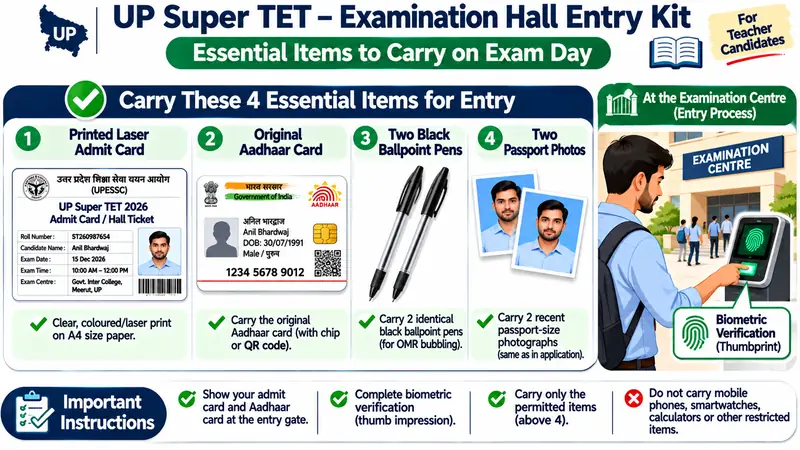
To ensure smooth biometric screening at the entry gate, carry:
- Printed Super TET Admit Card (clear copy, preferably laser printed).
- Original Government Photo ID (Aadhaar Card, Voter ID, Passport, or PAN Card).
- Two recent colored passport photographs (same as uploaded in the application).
- Two high-quality black ballpoint pens for OMR bubbling.
Frequently Asked Questions
Will Super TET admit cards be sent by post to my address?
No. UPESSC does not dispatch physical admit cards by post or courier. All candidates must download and print their hall tickets from the official portal at upessc.up.gov.in.
What should I do if I forgot my registration number or OTR ID?
Click on the "Forgot Registration Number / OTR ID" link on the UPESSC portal login page. Enter your registered mobile number and email ID to receive a verification OTP and retrieve your credentials instantly.