Step-by-Step Application Process (6-Step Walkthrough)
Applying online for UP Super TET (Advt 05/2026) is conducted entirely through the official portal of the Uttar Pradesh Education Service Selection Commission at upessc.up.gov.in.
Follow these six sequential steps to ensure error-free submission:
| Step | Action Required | Key Portal Screen | Critical Caution |
|---|---|---|---|
Step 1 | Generate OTR Number | OTR Registration Portal | Verify mobile & email via OTP; OTR takes ~24h to sync. |
Step 2 | Select Advertisement | Candidate Dashboard | Click "Advt. No. 05/2026 - Assistant Teacher (Primary)". |
Step 3 | Verify TET & Degree Details | Application Form Screen | Cross-check D.El.Ed roll number and CTET/UPTET certificate number. |
Step 4 | Upload Photo & Signature | Document Upload Module | Adhere strictly to pixel dimensions and file size limits. |
Step 5 | Pay Application Fee | SBI e-Pay Gateway | Do not refresh page during transaction processing. |
Step 6 | Download Final Confirmation Slip | Final Submission Screen | Download and print 2 copies for Document Verification. |
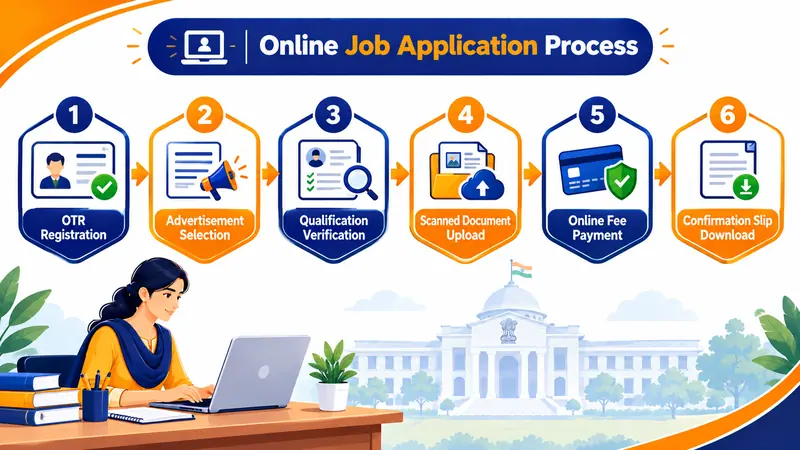
Stage 1: Mandatory UPESSC OTR Registration
Under new commission regulations, you cannot access the Super TET application form without an authentic One-Time Registration (OTR) number. The OTR system consolidates your permanent personal profile (Name, Father's Name, Aadhaar verification, caste, and domicile).
Vital Tip: If you already created an OTR profile for other UPESSC advertisements, log in with your existing OTR credentials; do not generate multiple OTR IDs, as duplicate profiles will be flagged for rejection. Read our full UPESSC OTR Guide.
Scanned Document & Photo Specifications
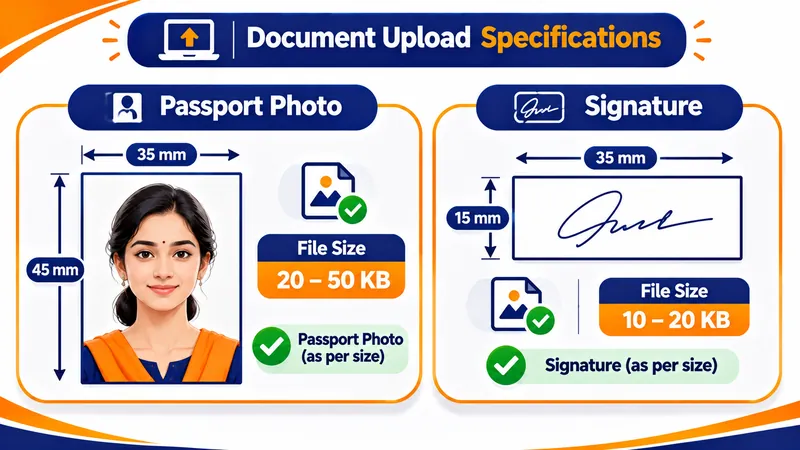
To prevent automatic upload rejection by the UPESSC portal software, prepare your digital files according to these exact technical parameters before opening the application form:
| Item | Format | Permissible File Size | Dimensions / Quality Specifications |
|---|---|---|---|
Passport Photograph | JPG / JPEG | 20 KB to 50 KB | 3.5 cm × 4.5 cm; white or light background; no caps/dark glasses. |
Candidate Signature | JPG / JPEG | 10 KB to 20 KB | 3.5 cm × 1.5 cm; signed with black ballpoint pen on white paper. |
UP Domicile Certificate | 100 KB to 300 KB | Legible digital scan; required for UP reservation benefits. | |
Caste / EWS Certificate | 100 KB to 300 KB | State government format issued by competent authority (Tehsildar). | |
D.El.Ed & TET Certificates | 100 KB to 300 KB | Original marksheet scan or verified DigiLocker e-certificate. |
Fee Payment & Category Rates
The application portal accepts fee deposits through the integrated SBI e-Pay payment engine. Accepted payment instruments include Net Banking, UPI (Google Pay, PhonePe, Paytm), and Visa/Mastercard/RuPay Debit/Credit Cards:
- General (UR) / OBC / EWS: ₹1,000
- SC / ST (UP Domicile): ₹500
- PwD (Divyangjan): ₹300
Troubleshooting Common Submission Errors
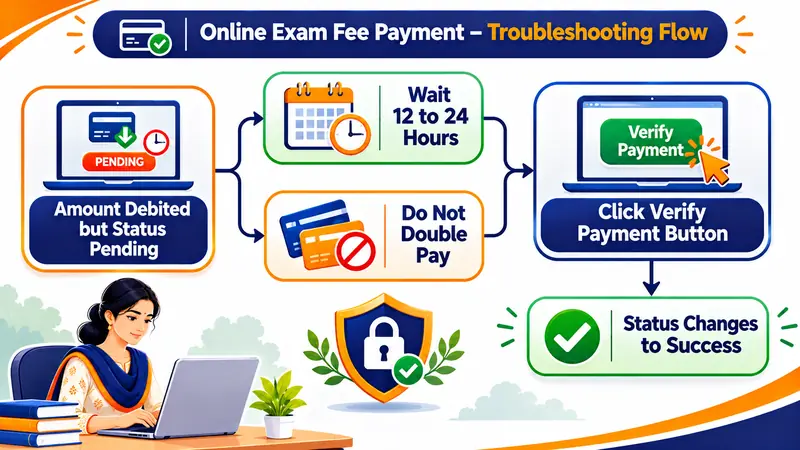
Do NOT make an immediate second payment! Banking gateways frequently experience settlement delays of 12 to 24 hours during peak closing days. Log out of the UPESSC portal and check again after 12 hours. The transaction status will typically update to "Success". If the status remains pending after 24 hours, click the "Verify Payment" button on the portal before initiating a new attempt.
- "Invalid OTR Number or Profile Incomplete": Ensure your OTR profile status indicates 100% completion and mobile OTP verification is verified before launching the Advt 05/2026 application link.
- "File Size Exceeded During Photo Upload": Use standard photo compression software to ensure your JPEG is strictly between 20 KB and 50 KB. The portal will reject files measuring 51 KB or larger.
- "Gateway Session Timed Out": Clear your browser cache or switch to an incognito window on Google Chrome / Mozilla Firefox. High traffic between 02 Nov and 04 Nov causes peak loads between 6 PM and 10 PM; try early morning hours (5 AM to 8 AM).
What to Do Immediately After Applying
Once your fee is confirmed and the portal generates your final Application Form:
- Download the full PDF confirmation slip containing your Registration Number and Barcode.
- Print at least two physical copies and store them with your original academic certificates.
- If you notice a typo in your name, father's name, or marks, note that the Application Correction Window is open until 07 November 2026. Read our Form Correction Instructions.
- Begin focused revision immediately using our 30-Day Study Plan.
Frequently Asked Questions
Can I edit my application form after final payment?
Yes. UPESSC allows form modifications during the official correction window open until 07 November 2026. However, critical fields like basic OTR identity (Name, Father's Name) must be corrected in OTR first.
Can I submit the Super TET application form offline via post?
No. Applications are accepted exclusively online through upessc.up.gov.in. No physical application forms or postal submissions will be entertained by the Commission.